
Managing billing becomes increasingly complicated as telecom businesses expand their customer base. Different customers may have different service packages, pricing agreements, billing dates, payment terms and usage requirements. Trying to process every customer's invoice through a single billing cycle can create unnecessary complexity and make financial operations harder to manage. This is where Multiple Bill Runs become valuable. Multiple bill runs allow telecom providers, Internet Telephony Service Providers (ITSPs) and Managed Service Providers (MSPs) to generate invoices for different customer groups separately. Instead of processing every customer at the same time, businesses can organise billing according to customer categories, service types, billing schedules or contractual agreements. With an organised billing approach, businesses can improve invoice accuracy, reduce administrative work and maintain better control over their revenue operations. In this guide, we will explore how multiple billing runs work, why they matter and how telecom businesses can use them to manage different customer groups more effectively. Multiple Bill Runs refer to the process of generating invoices for different customer groups through separate billing cycles or scheduled billing activities. Rather than creating invoices for all customers in one process, a business can divide its customer database into smaller groups and process each group independently. For example, a telecom provider might have: Monthly billing customers. Quarterly billing customers. Enterprise customers with customised agreements. Customers using prepaid services. Customers with usage-based pricing. Business customers with different invoice dates. Each group may have different billing requirements. Multiple bill runs make it possible to manage these requirements without disrupting the overall billing operation. This approach gives businesses greater flexibility and makes customer group billing easier to organise. Telecom businesses rarely operate with one standard billing arrangement for every customer. Their customers may subscribe to different services, purchase different packages and follow individual payment agreements. Using a single billing process for everyone can make billing operations difficult to manage. Here are some reasons why multiple billing runs are important. Not every customer follows the same billing schedule. For example, residential customers might receive monthly invoices, while enterprise customers may have quarterly billing arrangements. Some customers may also have individual billing dates based on their contract start dates. Multiple billing runs allow businesses to organise these customers into suitable groups and process their invoices accordingly. Billing schedule management is essential for maintaining predictable financial operations. With separate billing runs, businesses can define when specific customer groups should be invoiced. This helps prevent scheduling conflicts and makes it easier for finance teams to manage recurring billing activities. Manually selecting customers, checking service usage and preparing invoices can consume considerable time. Automated bill runs reduce repetitive activities by allowing businesses to process invoices according to predefined billing rules. This helps employees spend less time on routine administration and more time resolving customer issues and managing business operations. When different customer groups have different pricing structures, processing everything together can increase the possibility of billing errors. Separate billing processes make it easier to review pricing rules, service subscriptions and billing conditions for each group. This supports more consistent telecom invoice management. Processing invoices in organised batches gives finance teams better visibility into upcoming billing activities. Businesses can plan invoice generation, monitor outstanding payments and manage expected revenue more effectively. The process of multiple billing runs generally follows a structured workflow. Each billing run handles a selected group of customers based on predefined conditions. Although the exact process depends on the billing platform, the typical workflow includes the following steps. The first step is to organise customers according to their billing requirements. Common grouping criteria include: Customer type: Residential, business and enterprise. Service type: VoIP, DID numbers, broadband and call plans. Billing frequency: Monthly, quarterly and annual. Pricing model: Fixed recurring charges and usage-based charges. Contract terms: Standard and customised agreements. Proper customer categorisation creates a foundation for accurate and organised billing. Once customer groups are created, businesses can assign suitable billing schedules to each group. For example: These schedules are examples. Actual billing dates should follow customer agreements and business policies. Different customer groups may have different billing rules. A billing configuration may include: Monthly recurring charges. Usage-based charges. One-time setup fees. Discounts and promotional pricing. Taxes and additional charges. Payment terms. Proration rules. Setting up these rules correctly helps ensure that every customer receives an invoice based on their agreed services and pricing. After configuring customer groups and billing schedules, businesses can execute separate billing runs. Each run processes the customers assigned to that particular group. For example, a business may complete its residential billing run first, followed by small business billing and then enterprise billing. This makes it easier to monitor each billing activity independently. Before invoices are finalised or distributed, businesses should review the generated results. Important checks include customer details, service charges, usage records, discounts, taxes and invoice totals. Validation helps identify missing information or incorrect charges before invoices reach customers. Once the billing results have been checked, invoices can be generated and distributed through the business's preferred channels. Depending on the billing system, this may include email delivery, customer portals or other supported invoice distribution methods. This completes the billing cycle for the selected customer group. Businesses can organise multiple billing runs in different ways depending on their customer base and service offerings. A telecom provider may separate residential, small business and enterprise customers into individual billing groups. This allows finance teams to apply appropriate pricing structures, invoice formats and payment terms to each category. Customers may subscribe to different telecom services, including VoIP, SIP trunking, DID numbers, broadband and hosted PBX. Separating billing by service type can help businesses monitor service-related revenue and manage different charging requirements. Some customers may follow monthly billing, while others may have quarterly or annual payment arrangements. Multiple billing runs make it easier to process invoices according to these different schedules. Enterprise customers often negotiate individual rates, discounts and service agreements. Separate billing groups can help businesses manage these arrangements while maintaining greater control over customer-specific charges. Implementing multiple billing runs can improve several aspects of telecom billing operations. Processing customers in organised groups reduces the need to manage every invoice individually. Finance teams can follow structured billing workflows and complete routine activities more efficiently. Businesses can support different billing dates, service packages, payment terms and pricing arrangements without forcing every customer into the same billing structure. Separate billing runs make it easier to identify which customer groups have been processed, which invoices require review and which billing activities are still pending. When billing activities are organised by customer group, businesses can analyse revenue across different customer segments and service categories. This information can support better financial planning and business decisions. As customer numbers increase, billing requirements also become more demanding. A structured approach to multiple billing runs helps businesses manage larger customer databases without relying entirely on manual processes. Having multiple billing runs is useful, but businesses need a consistent process to manage them effectively. Here are some practical recommendations. 1. Maintain Accurate Customer Records Ensure customer information, service subscriptions, billing preferences and contract details are regularly updated. Incorrect customer records can affect invoice calculations and billing schedules. 2. Define Clear Billing Groups Create customer groups based on meaningful business requirements. Avoid unnecessary segmentation because too many billing groups can make administration more complicated. 3. Review Pricing Configurations Check recurring charges, usage rates, discounts, taxes and additional fees before executing billing runs. Correct pricing configurations help reduce disputes and incorrect invoices. 4. Monitor Each Billing Run Maintain visibility into completed, pending and unsuccessful billing runs. Reviewing the results helps teams identify problems and take corrective action quickly. 5. Automate Repetitive Billing Activities Use telecom billing software to automate invoice generation, recurring charges, usage calculations and other repetitive tasks wherever supported. 6. Maintain Proper Billing Records Keep records of invoice generation, billing adjustments, failed transactions and payment updates. Good documentation supports financial reviews and makes it easier to investigate customer queries. 7. Review Billing Performance Regularly Analyse invoice accuracy, processing time, outstanding payments and billing exceptions. Regular reviews help businesses identify opportunities to improve their billing processes. Managing multiple billing runs manually can become difficult, particularly when a business serves hundreds or thousands of customers. A dedicated Telecom Billing Software platform helps bring customer information, subscriptions, pricing rules, usage records and invoice generation into a connected workflow. Instead of relying on spreadsheets and disconnected tools, businesses can use a centralised system to organise and manage their billing activities. Important capabilities include: Customer Group Management: Organise customer accounts according to service requirements and billing arrangements. Multiple Bill Runs: Generate invoices for different customer groups independently. Flexible Billing Cycles: Support monthly, quarterly and customised billing schedules. Recurring Charges: Automatically calculate subscription and periodic service charges. Usage-Based Billing: Process call records and other usage information according to configured rates. Automated Invoicing: Generate invoices with relevant service and charge details. Billing Reports: Monitor billing activities, invoice values and outstanding balances. For telecom providers, these capabilities help create a more organised billing environment while reducing repetitive administrative work. The Bill Bot provides a Business Support System (BSS) designed for telecom providers, VoIP businesses, ITSPs and MSPs. Its Multiple Bill Runs functionality allows businesses to generate invoices for different customer groups independently and manage billing more flexibly. The platform also supports multiple billing cycles, recurring charges, usage billing, automated invoicing and customer-specific pricing capabilities. Business Support System for VoIP Provider+1 By bringing these billing activities into one platform, The Bill Bot helps service providers manage their billing operations with greater visibility and control. Businesses can explore the platform to understand how its billing capabilities align with their operational requirements. Explore: The Bill Bot Business Support System. Although multiple billing runs offer flexibility, businesses should plan their implementation carefully. Some common challenges include: Incorrect customer grouping: Customers assigned to the wrong billing group may receive invoices at inappropriate times. Overlapping billing schedules: Poorly configured schedules can lead to duplicate or unexpected invoice generation. Inconsistent pricing: Different price plans and contract terms need to be configured accurately. Incomplete usage records: Missing or delayed usage information can affect invoice totals. Limited monitoring: Without proper tracking, failed or incomplete billing runs may go unnoticed. These challenges can be addressed through accurate configuration, regular data checks, clear billing procedures and appropriate software automation. Managing different customer groups does not have to mean managing complicated billing processes. Multiple Bill Runs give telecom providers a practical way to organise invoices according to customer categories, service types, billing frequencies and individual pricing agreements. By separating billing activities, businesses can improve invoice accuracy, simplify billing cycle management, reduce manual workloads and gain better visibility into financial operations. As telecom businesses grow, having flexible and reliable billing processes becomes increasingly important. Investing in suitable telecom billing software can help providers manage multiple billing requirements while building a more efficient and scalable operation. For VoIP providers, ITSPs and MSPs looking to improve their billing workflows, The Bill Bot offers billing and business management capabilities designed to support these operational needs. Multiple Bill Runs allow telecom businesses to generate invoices for different customer groups separately. Each billing run can follow specific billing schedules, pricing rules and customer requirements. Yes. Suitable telecom billing platforms support multiple billing cycles, allowing businesses to manage monthly, quarterly and customised billing schedules for different customer groups. They help businesses organise customers into separate groups, apply relevant pricing configurations and review billing results independently. This makes it easier to identify incorrect charges and billing discrepancies. Yes. Businesses can use different pricing plans, recurring charges, usage-based rates and discounts for different customer groups, depending on their billing software capabilities. Multiple Billing Cycles refer to different invoice schedules, such as monthly, quarterly or annually. Multiple Bill Runs refer to separate invoice-processing activities used to generate invoices for selected customer groups or billing periods. It is not essential for every small business, but dedicated telecom billing software makes the process significantly easier as customer numbers, pricing structures and billing requirements grow. VoIP providers, ITSPs, MSPs, ISPs and other telecom service providers can benefit from multiple bill runs, particularly when they manage different customer categories, service packages and billing arrangements. Yes. Billing platforms with automation capabilities can execute configured billing processes, calculate charges and generate invoices with less manual intervention.What Are Multiple Bill Runs?
Why Do Telecom Businesses Need Multiple Billing Runs?
1. Different Customer Groups Have Different Billing Requirements
2. Better Control Over Billing Schedules
3. Reduced Manual Work
4. Improved Invoice Accuracy
5. Easier Financial Planning
How Do Multiple Bill Runs Work?
Step 1: Categorise Customers into Groups
Step 2: Define Separate Billing Schedules
Step 3: Configure Billing Rules
Step 4: Execute Individual Bill Runs
Step 5: Review and Validate Generated Invoices
Step 6: Generate and Distribute Invoices
3. Common Ways to Organise Multiple Bill Runs
Billing Based on Customer Type
Billing Based on Service Type
Billing Based on Billing Frequency
Billing Based on Custom Pricing
4. Key Benefits of Multiple Bill Runs
Improved Operational Efficiency
Greater Billing Flexibility
Easier Billing Management
Better Revenue Visibility
Support for Business Growth
5. Best Practices for Managing Multiple Billing Runs
6. How Telecom Billing Software Simplifies Multiple Bill Runs
How The Bill Bot Supports Multiple Bill Runs
7. Challenges to Consider When Implementing Multiple Bill Runs
Conclusion
Frequently Asked Questions (FAQs)
1. What are Multiple Bill Runs in telecom billing?
2. Can businesses run multiple billing cycles simultaneously?
3. How do Multiple Bill Runs improve billing accuracy?
4. Can Multiple Bill Runs support different pricing plans?
5. What is the difference between Multiple Bill Runs and Multiple Billing Cycles?
6. Is telecom billing software necessary for managing Multiple Bill Runs?
7. Which businesses benefit from Multiple Bill Runs?
8. Can Multiple Bill Runs be automated?
Multiple Bill Runs: How to Bill Different Customer Groups Separately

Bhargav
Nov 13, 2026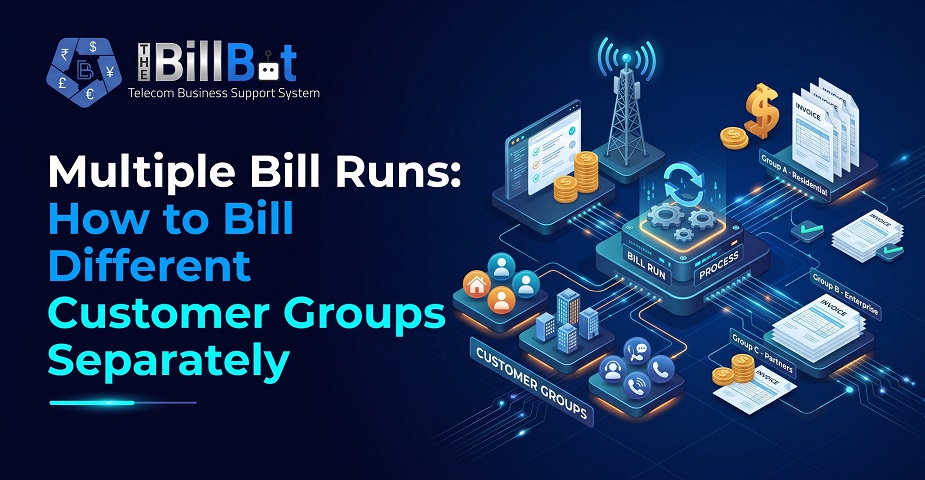
Table of Contents
- What Are Multiple Bill Runs?
- Why Do Telecom Businesses Need Multiple Billing Runs?
- 1. Different Customer Groups Have Different Billing Requirements
- 2. Better Control Over Billing Schedules
- 3. Reduced Manual Work
- 4. Improved Invoice Accuracy
- 5. Easier Financial Planning
- How Do Multiple Bill Runs Work?
- Step 1: Categorise Customers into Groups
- Step 2: Define Separate Billing Schedules
- Step 3: Configure Billing Rules
- Step 4: Execute Individual Bill Runs
- Step 5: Review and Validate Generated Invoices
- Step 6: Generate and Distribute Invoices
- 3. Common Ways to Organise Multiple Bill Runs
- Billing Based on Customer Type
- Billing Based on Service Type
- Billing Based on Billing Frequency
- Billing Based on Custom Pricing
- 4. Key Benefits of Multiple Bill Runs
- Improved Operational Efficiency
- Greater Billing Flexibility
- Easier Billing Management
- Better Revenue Visibility
- Support for Business Growth
- 5. Best Practices for Managing Multiple Billing Runs
- 6. How Telecom Billing Software Simplifies Multiple Bill Runs
- How The Bill Bot Supports Multiple Bill Runs
- 7. Challenges to Consider When Implementing Multiple Bill Runs
- Conclusion
- Frequently Asked Questions (FAQs)
- 1. What are Multiple Bill Runs in telecom billing?
- 2. Can businesses run multiple billing cycles simultaneously?
- 3. How do Multiple Bill Runs improve billing accuracy?
- 4. Can Multiple Bill Runs support different pricing plans?
- 5. What is the difference between Multiple Bill Runs and Multiple Billing Cycles?
- 6. Is telecom billing software necessary for managing Multiple Bill Runs?
- 7. Which businesses benefit from Multiple Bill Runs?
- 8. Can Multiple Bill Runs be automated?
Author : Bhargav
Published : 13 Nov 2026
Related Articles
Explore more insights
12 Nov 2026 / Bhargav
Telecom Rate Sheets Explained: Managing Customer-Specific Pricing
07 Nov 2026 / Bhargav
What Should a Telecom Customer Portal Include? Essential Features for Providers
06 Nov 2026 / Bhargav