Introduction
For Internet Telephony Service Providers (ITSPs), managing leads and onboarding new customers are essential parts of business growth. As competition increases and customers expect faster responses, relying on spreadsheets, emails, and manual follow-ups can make the sales process difficult to manage.
A potential customer might enquire about VoIP services, business telephone systems, SIP trunking, DID numbers, or customised communication packages. If that enquiry is not followed up promptly, the opportunity could be lost to a competitor. Even after a customer agrees to purchase, delays in collecting information, configuring services, and creating billing accounts can affect their first impression.
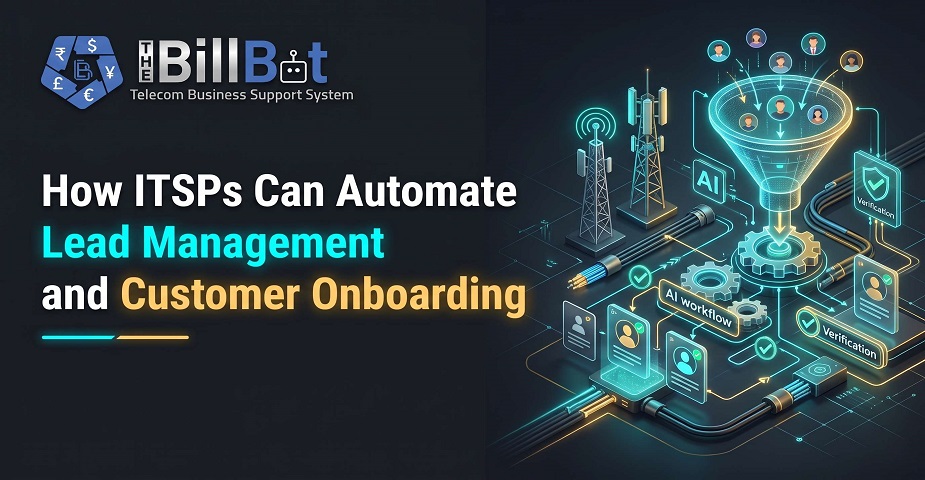
This is where ITSP Lead Management becomes important. By automating lead tracking, sales follow-ups, customer information collection, and onboarding workflows, ITSPs can reduce repetitive work and create a more consistent customer experience.
With the right processes and technology, telecom providers can manage enquiries more efficiently, convert more qualified leads into customers, and simplify the journey from the first enquiry to service activation.
What Is ITSP Lead Management?
ITSP Lead Management is the process of capturing, organising, tracking, and nurturing potential customers interested in an ITSP's services. It helps sales teams understand where each lead comes from, what services they require, and what action is needed to move them towards a purchase.
For example, a business may enquire about SIP trunking for its offices. The sales team needs to record the company's contact details, understand its call volume, identify the required number of channels, prepare a suitable quotation, and follow up until a decision is made.
Without a structured process, these activities can become scattered across different systems.
An effective lead management process typically includes:
Lead capture from websites, referrals, email, and sales campaigns.
Lead assignment to the appropriate sales representative.
Qualification based on customer requirements and business potential.
Follow-up reminders and sales activity tracking.
Quotation preparation and proposal management.
Conversion of qualified leads into customers.
Handover of customer details to onboarding and billing teams.
A structured approach to Lead Management for ITSPs helps businesses maintain visibility throughout the sales journey instead of depending on manual tracking.
Why Do ITSPs Need to Automate Lead Management?
As an ITSP grows, the number of enquiries, quotations, customer records, and follow-up activities can increase significantly. Managing every task manually requires time and creates opportunities for mistakes.
Automation helps address these challenges by standardising routine activities and making customer information easier to access.
1. Prevent Missed Sales Opportunities
When sales representatives manage enquiries through separate inboxes or spreadsheets, it becomes difficult to know which leads require immediate attention.
Automated Lead Management can capture enquiries, assign them to team members, and trigger reminders when follow-ups are due. Sales representatives can see which opportunities need attention and avoid leaving promising prospects unattended.
2. Improve Lead Response Times
Customers often compare multiple service providers before choosing a solution. A slow response may reduce their interest, particularly when they need business connectivity or telephone services urgently.
Automated acknowledgements, task assignments, and follow-up notifications help ITSPs respond more consistently. Sales representatives can spend less time organising their workload and more time understanding customer requirements.
3. Maintain Accurate Customer Information
Duplicate records, missing contact details, and outdated sales notes can create confusion between departments.
Lead Management Software for Telecom businesses can provide a central place to maintain lead information, communication history, requirements, and sales status. This improves visibility and helps teams work with more reliable information.
4. Support Business Growth Without Increasing Manual Work
As enquiry volumes grow, adding more spreadsheets and administrative tasks is rarely a sustainable solution.
ITSP Business Automation allows businesses to standardise recurring processes, making it easier to manage more opportunities without increasing administrative effort at the same rate.
How to Automate Lead Management for ITSPs
Automation works best when it follows a clear sales process. ITSPs should identify repetitive tasks, define responsibilities, and configure workflows that match their business requirements.
Step 1: Capture Leads from Multiple Channels
Potential customers may contact an ITSP through website forms, email campaigns, telephone calls, referrals, or social media.
Instead of entering every enquiry manually, businesses can connect suitable channels to a central lead management system.
When a prospect submits an enquiry, the system can record relevant information such as:
Company name and contact details.
Services of interest, such as VoIP, SIP trunking, or DID numbers.
Estimated number of users or extensions.
Current communication requirements.
Preferred contact method and follow-up date.
A centralised process reduces the likelihood of enquiries being overlooked and gives sales teams a clearer picture of incoming demand.
Step 2: Qualify and Assign Leads Automatically
Not every enquiry represents the same business opportunity. Some prospects may need a simple VoIP package, while others may require a larger communication solution with multiple locations and complex integrations.
ITSPs can establish qualification rules based on service requirements, company size, location, budget, or other relevant criteria.
For example, enquiries about enterprise SIP trunking could be assigned to a specialist sales representative, while smaller business enquiries could enter a standard sales workflow.
Automated assignment helps teams distribute work more consistently and ensures that leads reach the people best equipped to handle them.
Step 3: Automate Sales Follow-Ups
Following up at the right time is an important part of successful sales management. However, remembering every call, quotation, and email becomes difficult when representatives manage numerous opportunities.
ITSP Sales Automation can generate reminders when a quotation has not received a response, schedule follow-up tasks after a product demonstration, or notify a sales representative when a prospect has been inactive for a defined period.
These workflows help businesses maintain consistent communication without sending unnecessary messages.
Automation should support personal communication rather than replace it. Sales representatives still need to understand each prospect's concerns and provide relevant recommendations.
Step 4: Track Every Lead Through the Sales Pipeline
A visual sales pipeline helps ITSPs understand the status of their opportunities.
A typical pipeline may include the following stages:
New enquiry.
Lead qualification.
Requirement analysis.
Quotation sent.
Negotiation.
Won or lost.
When a lead progresses to another stage, the system can update its status and create the next relevant task.
Managers can also review the number of opportunities at each stage, identify delays, and understand where potential customers are dropping out of the sales process.
Step 5: Use Telecom CRM Software to Improve Visibility
Telecom CRM Software helps businesses maintain customer and prospect information in a more organised way. Depending on the platform, it may also support sales activities, service history, account management, and communication tracking.
When sales representatives can view previous conversations and customer requirements in one place, they can provide more relevant responses and avoid repeatedly requesting the same information.
A connected CRM environment also makes it easier for sales, operations, and customer support teams to share information when a prospect becomes a customer.
How Customer Onboarding Automation Simplifies the Process
Converting a lead into a paying customer is only the beginning. The next step is to collect the necessary information, configure the agreed services, establish billing arrangements, and prepare the customer to use the service.
ITSP Customer Onboarding can involve several departments, making it a strong candidate for workflow automation.
1. Collect Customer Information Digitally
After a prospect accepts a quotation, the onboarding process may require company details, billing contacts, service addresses, authorised contacts, and technical requirements.
Customer Onboarding Software can help businesses collect this information through structured forms and maintain it in a centralised record.
Required-field checks can help identify missing information before the onboarding process moves forward. This reduces repeated emails and delays caused by incomplete records.
Sensitive customer information should be collected and stored through appropriately secured systems, with access limited to authorised personnel.
2. Automate Customer Account Creation
Once the necessary information is available, the business may need to create a customer account in its operational or billing system.
Where supported, integrations can transfer approved customer details into the relevant system rather than requiring staff to enter the same information again.
For example, an ITSP may automate the handover of customer details, selected service plans, billing contacts, and agreed commercial terms from the sales process to account administration.
The exact workflow depends on the systems involved. Businesses should validate transferred information before activating services or generating charges.
3. Streamline Service Configuration and Activation
Telecom onboarding often requires coordination between sales and technical teams. Depending on the service, this could include allocating telephone numbers, configuring SIP trunks, creating extensions, setting up routing, or connecting customer equipment.
Automation can generate provisioning tasks when an order reaches an approved stage and notify the responsible team when action is required.
Where technical platforms support automated provisioning, some configuration steps may also be completed through integrations.
This creates a clearer handover between departments and helps teams identify outstanding activation tasks.
4. Connect Onboarding with Billing and Invoicing
Billing setup is another important part of customer onboarding. Incorrect pricing, missing billing information, or an unsuitable billing cycle can lead to disputes later.
An integrated business support system can help transfer approved pricing, service selections, billing frequency, and customer account details into the billing workflow.
Depending on the platform, ITSPs may also configure recurring charges, usage-based billing, invoice delivery preferences, and payment arrangements.
Connecting onboarding with billing helps establish a more consistent process from customer acquisition to the first invoice.
5. Keep Customers Informed Throughout Onboarding
Customers want to know what happens after they place an order. Silence during onboarding can lead to unnecessary support requests and uncertainty.
Automated notifications can acknowledge submitted information, confirm that an order is being processed, request missing details, or communicate important milestones.
For example, an ITSP could notify a customer when their account setup is complete and explain the next steps before service activation.
These updates help set expectations and make the onboarding experience more transparent.
Key Benefits of Automating Lead Management and Customer Onboarding
When sales and onboarding workflows are connected, ITSPs can improve several aspects of their operations.
Reduced administrative workload: Automation handles repetitive tasks such as assigning leads, scheduling reminders, collecting information, and creating internal tasks.
Better sales visibility: Managers can review pipeline stages, follow-up activity, and lead conversion trends to identify opportunities for improvement.
Faster customer handovers: Sales information can move to operations and billing teams through defined workflows, reducing duplicate data entry.
More consistent customer experiences: Standardised onboarding steps help ensure that customers receive the required information and attention.
Fewer avoidable errors: Validation rules and integrated data transfers can reduce mistakes caused by manual entry, although appropriate checks remain necessary.
Improved scalability: A well-designed workflow allows ITSPs to handle increasing lead and customer volumes without relying entirely on additional manual administration.
The results depend on the quality of the workflows, the systems being integrated, and how consistently employees use them.
Best Practices for Implementing ITSP Business Automation
Before introducing automation, ITSPs should focus on building processes that are practical, measurable, and easy for their teams to follow.
Map the Existing Process
Document how leads currently enter the business, how sales representatives follow up, and what happens after a quotation is accepted. This helps identify delays and repetitive tasks worth automating.
Start with High-Impact Workflows
Begin with a few common activities, such as lead assignment, follow-up reminders, customer information collection, or onboarding task creation. Expand automation after confirming that the initial workflows work reliably.
Integrate Systems Where Practical
Disconnected CRM, provisioning, and billing platforms can create unnecessary manual work. Evaluate whether the systems can exchange information through supported APIs or other integrations.
Establish Clear Ownership
Automation does not remove the need for accountability. Define who handles unqualified leads, overdue quotations, incomplete customer records, and provisioning exceptions.
Monitor Performance
Track metrics such as lead response time, lead-to-customer conversion rate, onboarding completion time, incomplete records, and first-invoice accuracy. These measurements can help businesses understand whether automation is improving their processes.
Review and Improve Workflows
Business requirements change as an ITSP introduces new services or enters new markets. Review workflows regularly to remove unnecessary steps, update rules, and maintain accurate customer information.
How The Bill Bot Can Support ITSP Operations
ITSPs looking to improve sales-to-billing workflows may benefit from a business support system that brings relevant operational processes together.
The Bill Bot provides a business support platform for telecom and IT service providers, with capabilities focused on billing, customer management, automation, reporting, and integrations.
For businesses evaluating an integrated operational approach, explore The Bill Bot website to learn more about its platform and features.
By connecting relevant business processes and reducing repetitive administrative work, ITSPs can work towards a more organised customer journey, from the first sales enquiry through account setup and ongoing billing.
Conclusion
Automating lead management and customer onboarding gives ITSPs a practical way to improve sales coordination, reduce administrative effort, and create a more consistent customer experience.
Effective ITSP Lead Management helps businesses capture enquiries, qualify opportunities, organise follow-ups, and track progress through the sales pipeline. Customer onboarding automation then helps transfer approved information, coordinate service activation, establish billing details, and keep customers informed.
The greatest value comes when these processes work together rather than operating as separate activities. By identifying repetitive tasks, integrating suitable systems, and measuring performance, ITSPs can build a more efficient operation that supports long-term growth.
For telecom providers that want to scale while maintaining service quality, automation is not simply about doing tasks faster. It is about creating a reliable process that connects sales, operations, billing, and customer experience.
Frequently Asked Questions (FAQs)
1. What is ITSP Lead Management?
ITSP Lead Management is the process of capturing, qualifying, tracking, and nurturing potential customers interested in an Internet Telephony Service Provider's services. It helps sales teams organise enquiries, manage follow-ups, and convert suitable prospects into customers.
2. How can ITSPs automate lead management?
ITSPs can automate lead management by connecting enquiry forms to a central system, assigning leads automatically, setting follow-up reminders, tracking sales pipeline stages, and generating notifications when action is required.
3. What is ITSP Customer Onboarding?
ITSP Customer Onboarding is the process of setting up a new customer after a purchase decision. It may include collecting business information, creating customer accounts, configuring telecom services, establishing billing arrangements, and communicating activation updates.
4. How does Telecom Lead Management Software help sales teams?
Telecom Lead Management Software can centralise prospect information, organise sales activities, track opportunities, and automate routine reminders. These capabilities help sales teams maintain visibility and manage enquiries more consistently.
5. Can customer onboarding automation reduce manual errors?
Yes. Customer onboarding automation can reduce errors by validating required information, transferring data between connected systems, and standardising workflows. However, businesses still need appropriate approval steps, data checks, and exception handling.
6. What role does Telecom CRM Software play in lead management?
Telecom CRM Software helps businesses maintain prospect and customer records, track communications, and organise sales activities. Depending on its capabilities, it can also support customer account management and integration with billing or operational systems.
7. How can ITSPs measure the success of automation?
ITSPs can monitor lead response times, conversion rates, follow-up completion, onboarding duration, data accuracy, and first-invoice errors. Comparing these measurements before and after implementation can help assess the impact of automation.
8. Is it necessary to automate every business process at once?
No. ITSPs can begin with repetitive, high-impact tasks such as lead assignment, sales reminders, and customer data collection. Once these workflows are reliable, they can gradually automate additional onboarding and billing activities.