For ITSPs (Internet Telephony Service Providers), managing customer relationships is more than keeping contact details in a database. Customers expect fast responses, accurate information, smooth onboarding, reliable services, and proactive support. At the same time, ITSP teams often manage leads, customer accounts, service plans, billing information, support requests, communications, and follow-ups across different systems. This is where CRM Automation can make a significant difference. CRM automation allows ITSPs to automate repetitive customer management activities while keeping important customer information organised and accessible. Instead of relying heavily on spreadsheets, manual data entry, emails, and disconnected tools, businesses can create structured workflows that move customer information and tasks through the right processes automatically. Modern telecom CRM platforms are increasingly designed to connect customer information with services, billing, interactions, and operational workflows. This creates a more complete view of the customer and helps teams manage the customer lifecycle more efficiently. CRM Automation is the use of technology to automatically perform repetitive customer relationship management tasks. For an ITSP, these tasks can include: Capturing and organising new leads Assigning leads to sales representatives Sending follow-up notifications Creating customer accounts Managing onboarding workflows Tracking customer interactions Scheduling customer communications Managing service-related tasks Triggering reminders Updating customer records Connecting CRM information with billing and other systems Instead of employees manually completing every step, predefined workflows can trigger the next action when a specific event occurs. For example, when a prospect becomes a customer, an automated workflow could create the customer account, notify the relevant team, initiate onboarding tasks, and schedule follow-ups. This approach allows employees to spend less time on repetitive administrative work and more time on customer service, sales, and business development. ITSPs manage customer relationships across multiple stages, from the first enquiry through onboarding, service delivery, billing, support, upgrades, renewals, and retention. The challenge is that customer information can become fragmented. Sales may have information about the prospect. The support team may have information about previous issues. The billing team may have payment and invoice information. Operations may have service-related details. When these teams work with disconnected information, employees may need to search across multiple systems before they can understand a customer's situation. Telecom CRM solutions are designed to address this type of complexity by bringing customer, account, service, billing, and interaction information together. One of the biggest advantages of CRM Automation for ITSPs is the ability to organise customer information in a centralised system. A customer profile can contain information such as: Contact details Company information Active services Account history Communication history Support interactions Quotes and orders Billing information Payment activity Customer preferences With a centralised customer record, employees can access relevant information without searching through multiple spreadsheets, emails, or applications. A unified customer view is a common capability of telecom-focused CRM platforms because it helps teams understand customer relationships across different touchpoints. Lead management is an important part of customer acquisition for ITSPs. Without automation, sales teams may manually record leads, assign them to team members, schedule follow-ups, and update lead statuses. With CRM Automation, these activities can become part of an automated workflow. For example: New Lead → Lead Assignment → Follow-Up → Qualification → Quote → Customer When a new enquiry is submitted, the CRM can automatically create a lead record and assign it to the appropriate salesperson. Automated reminders can then help ensure that follow-ups do not get forgotten. This gives sales teams a more structured way to manage opportunities while reducing repetitive administrative tasks. Customer onboarding is one of the most important stages of the customer lifecycle. A slow or disorganised onboarding process can create unnecessary delays and additional work for employees. With CRM Automation for ITSPs, onboarding tasks can be triggered automatically after a customer signs up. A workflow could include: Create the customer account Verify customer information Assign services Notify the operations team Create required tasks Send a welcome email Schedule an onboarding follow-up This creates a consistent process and makes it easier for teams to track onboarding progress. Customers often communicate with ITSPs through multiple channels and for different reasons. They may ask about services, invoices, upgrades, technical issues, payments, or account changes. CRM automation can help businesses manage communication more systematically. Automated notifications can be triggered by specific customer events, such as: New account creation Service activation Invoice generation Payment confirmation Payment due date Support ticket updates Service changes Contract or renewal dates This does not mean every communication needs to be automated. Instead, automation can handle predictable communications while employees focus on conversations that require human attention. For ITSPs, customer management cannot always be separated from billing and service management. A customer's relationship with the provider may involve service subscriptions, usage, invoices, payments, and support. Integrating CRM with billing and other operational systems can give teams a more complete understanding of the customer. Telecom-focused platforms commonly connect CRM with billing, usage, provisioning, and customer service processes to reduce information silos. For example, when an invoice is generated, relevant information can be made available to customer-facing teams. This can help an employee understand the customer's account before responding to a billing-related question. Manual data entry can consume a considerable amount of employee time. It can also create inconsistencies when the same customer information has to be entered into multiple systems. CRM Software for ITSPs can reduce this repetitive work by automating data movement between connected processes. For example, information captured during lead management can be reused during customer onboarding rather than entered again from scratch. When CRM, billing, support, and service systems are connected, information can flow between processes more efficiently. Customer support teams need context to provide useful answers. If an agent only sees a customer's name and contact details, they may need to search elsewhere for service information, previous interactions, invoices, or account history. A well-designed ITSP CRM Software solution can bring relevant information together. Support staff may be able to view: Customer profile Active services Previous interactions Support history Orders Invoices Payments Account activity This type of customer visibility can help teams understand the issue before responding. Without standardised workflows, different employees may handle the same customer process differently. One salesperson may follow up after one day, another after three days, while another may forget the follow-up completely. CRM Automation Software allows businesses to define repeatable workflows. For example: Lead Created → Assign Owner → Follow Up → Qualification → Quote → Follow Up → Conversion Once the workflow is defined, the system can automatically create tasks and notifications based on specific conditions. This helps create greater consistency across customer management processes. Customer retention begins with understanding the customer lifecycle. An automated CRM can help ITSPs track important customer events, such as renewals, service changes, unresolved support requests, or inactivity. For example, an ITSP could create automated reminders before a customer's contract or service renewal date. Similarly, customer activity can be used to identify accounts that may require additional attention. CRM systems in telecom environments can combine customer information, service data, and interaction history to provide a more complete understanding of the customer relationship. Automation also improves the availability of customer management data. Instead of manually preparing reports, businesses can use CRM dashboards and reporting tools to monitor information such as: Number of new leads Lead conversion rates Customer onboarding progress Open support cases Follow-up activities Customer service activity Renewal activity Sales pipeline Customer account trends These insights can help management understand how customer processes are performing and identify areas that may require attention. The difference can be significant. The goal is not necessarily to remove human involvement. Instead, CRM Automation handles predictable and repetitive activities so employees can focus on tasks where human interaction adds more value. When evaluating CRM Software for ITSPs, businesses should consider whether the platform supports their complete customer lifecycle. Important capabilities may include: The system should provide a consolidated view of customer information, services, interactions, and account activity. Look for configurable workflows that can automate lead management, onboarding, follow-ups, notifications, and other repetitive processes. For ITSPs, CRM and billing often need to work together. Integration can help teams access relevant financial and service information within customer workflows. The CRM should support service-related information and help teams manage customer requests efficiently. Dashboards and reports can help management monitor sales, customer activity, service performance, and operational processes. APIs and integrations are important when the CRM needs to communicate with billing platforms, PBX systems, support tools, payment gateways, or other business applications. For ITSPs and MSPs, customer management is closely connected with billing, services, payments, and business operations. A platform such as The Bill Bot can bring these business processes together so providers can manage important customer and billing activities from a connected environment. When customer management, billing, invoicing, payments, usage information, and reporting work together, teams can reduce the need to move information manually between separate processes. The broader goal of CRM automation is simple: create a more organised customer lifecycle where routine activities can happen automatically while teams remain focused on customers and business growth. CRM Automation can transform how ITSPs manage customer relationships by replacing repetitive manual processes with structured, automated workflows. From lead management and onboarding to customer communication, billing integration, support, reporting, and retention activities, automation can help create a more consistent customer management process. For ITSPs managing growing customer bases and increasingly complex services, choosing the right CRM for ITSPs can help connect customer information and business processes in a more organised way. The key is not simply to automate everything. It is to identify repetitive processes, connect the right systems, centralise important customer information, and use automation where it creates practical value. When implemented thoughtfully, CRM automation can give ITSP teams more time to focus on what matters most: serving customers, managing relationships, and building a sustainable service business. CRM Automation is the use of software to automate repetitive customer relationship management activities such as lead assignment, follow-ups, onboarding, notifications, customer updates, and reporting. ITSPs manage complex customer relationships involving sales, services, billing, support, and communications. CRM Automation helps organise these processes and reduce repetitive manual work. CRM for ITSPs is customer relationship management software designed or configured to support the needs of Internet Telephony Service Providers, including customer accounts, services, interactions, sales, support, and related business processes. Yes. CRM platforms can integrate with billing and other telecom systems so customer, service, usage, and financial information can be connected across business workflows. It can give support teams access to centralised customer information, automate notifications and follow-ups, and create structured workflows for handling customer requests. Important features can include customer management, workflow automation, lead management, service management, billing integration, reporting, communication tools, and API integrations. Yes. Automation can reduce repetitive activities such as data entry, task assignment, follow-up reminders, notifications, and routine customer updates. Yes. As an ITSP grows, manually managing customer information and repetitive workflows can become increasingly difficult. Automation provides structured processes that can support larger customer volumes.What Is CRM Automation?
Why ITSPs Need Better Customer Management
How CRM Automation Improves Customer Management for ITSPs
1. Centralises Customer Information
2. Automates Lead Management
3. Streamlines Customer Onboarding
4. Improves Customer Communication
5. Connects CRM With Billing and Service Data
6. Reduces Manual Data Entry
7. Helps Customer Support Teams Work Faster
8. Creates Consistent Workflows
9. Supports Better Customer Retention
10. Provides Useful Reports and Insights
CRM Automation vs Manual Customer Management
What to Look for in CRM Automation Software for ITSPs
Customer 360-Degree View
Workflow Automation
Billing Integration
Service Management
Reporting and Analytics
Integration Capabilities
How The Bill Bot Can Support Automated Customer Management
Final Thoughts
Frequently Asked Questions
1. What is CRM Automation?
2. Why is CRM Automation important for ITSPs?
3. What is CRM for ITSPs?
4. Can CRM Automation integrate with telecom billing systems?
5. How does CRM Automation improve customer service?
6. What features should ITSP CRM Software have?
7. Can CRM Automation help reduce manual work?
8. Is CRM Automation useful for growing ITSPs?
 Book a Demo
How CRM Automation Can Improve Customer Management for ITSPs
Bhargav
Sep 28, 2026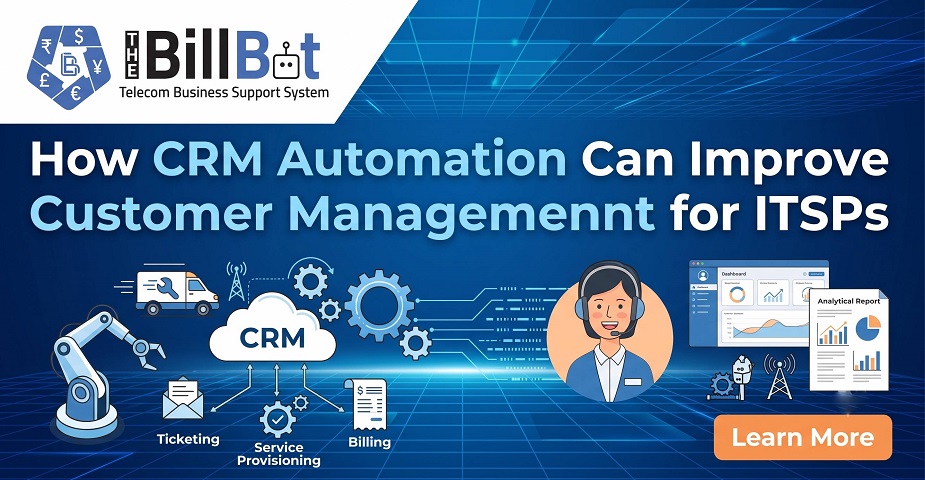
Table of Contents
- What Is CRM Automation?
- Why ITSPs Need Better Customer Management
- How CRM Automation Improves Customer Management for ITSPs
- 1. Centralises Customer Information
- 2. Automates Lead Management
- 3. Streamlines Customer Onboarding
- 4. Improves Customer Communication
- 5. Connects CRM With Billing and Service Data
- 6. Reduces Manual Data Entry
- 7. Helps Customer Support Teams Work Faster
- 8. Creates Consistent Workflows
- 9. Supports Better Customer Retention
- 10. Provides Useful Reports and Insights
- CRM Automation vs Manual Customer Management
- What to Look for in CRM Automation Software for ITSPs
- Customer 360-Degree View
- Workflow Automation
- Billing Integration
- Service Management
- Reporting and Analytics
- Integration Capabilities
- How The Bill Bot Can Support Automated Customer Management
- Final Thoughts
- Frequently Asked Questions
- 1. What is CRM Automation?
- 2. Why is CRM Automation important for ITSPs?
- 3. What is CRM for ITSPs?
- 4. Can CRM Automation integrate with telecom billing systems?
- 5. How does CRM Automation improve customer service?
- 6. What features should ITSP CRM Software have?
- 7. Can CRM Automation help reduce manual work?
- 8. Is CRM Automation useful for growing ITSPs?
Author : Bhargav
Published : 28 Sep 2026
Related Articles
Explore more insights
26 Sep 2026 / Bhargav
How a Telecom BSS Can Streamline Operations for ITSPs and MSPs
25 Sep 2026 / Bhargav
How to Manage Telecom Products and Services in One Platform
24 Sep 2026 / Bhargav